ふるさと納税で損をしたくない方へ。年収500万円の独身者なら約6万円、年収700万円の夫婦なら約8万円が控除上限額の目安です。
このシミュレーターは、あなたの年収・家族構成・各種控除から、実質2,000円で寄付できる上限額を計算します。所得税率と住民税所得割額を考慮した正確な計算式を使用しています。
入力は3ステップ30秒。給与年収を入力し、家族構成を選び、該当する控除を選択するだけです。計算結果はその場で表示され、安全マージンを含めた推奨寄付額もわかります。
目次
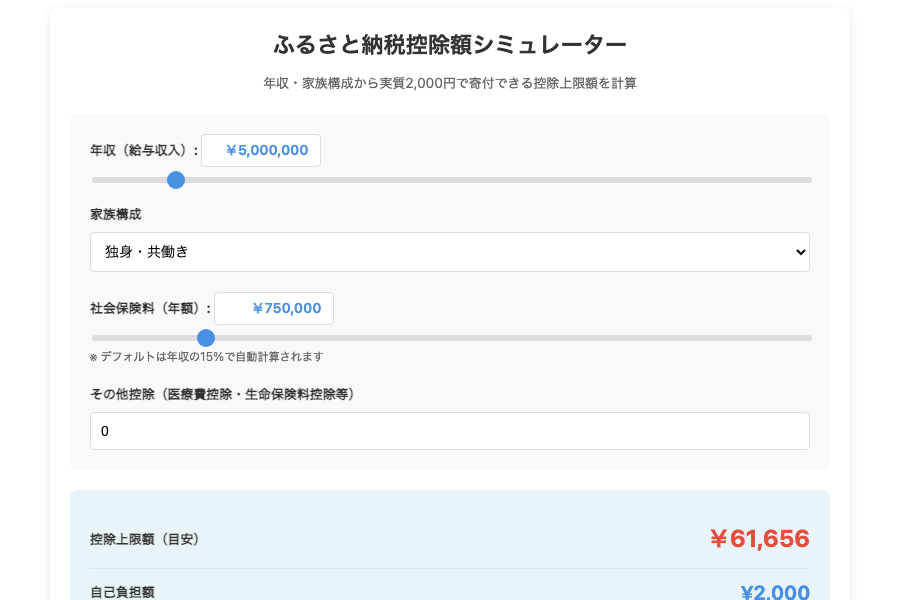
ふるさと納税控除額シミュレーター
ふるさと納税控除額シミュレーター
年収・家族構成から実質2,000円で寄付できる控除上限額を計算
控除上限額(目安)
¥0
自己負担額
¥2,000
節税効果(目安)
¥0
💡 ポイント
控除上限額までの寄付なら、自己負担は実質2,000円のみ。
上限を超えた分は控除されず、全額自己負担となります。
⚠️ 注意事項
・このシミュレーターは簡易計算による目安です。正確な控除額は税務署にご確認ください。
・給与所得者を想定しており、事業所得・不動産所得等は考慮していません。
・住宅ローン控除等の税額控除は計算に含まれていません。
・計算結果に基づく損害について、当サイトは一切の責任を負いません。
コピー用コード
<!--
================================================
WordPress カスタムHTMLブロック用コード
ふるさと納税控除額シミュレーター(簡易版・公的機関版)
================================================
【機能】年収・家族構成から控除上限額を計算(グラフ表示を除く)
【セキュリティ】✅ ブラウザ内完結 ✅ 通信ゼロ ✅ 外部CDN依存なし
【利用規約】無償・無保証、税務判断は自己責任
【特徴】Chart.js不使用・完全スタンドアロン・アクセシビリティ対応
【外部依存】なし
【データソース】総務省ふるさと納税ポータル、国税庁タックスアンサー
【計算式】所得税・住民税の控除額から上限額を逆算
================================================
-->

<!-- MSIM:STYLE-START -->
<style>
.furusato-simulator{box-sizing:border-box;max-width:800px;margin:0 auto;padding:20px;font-family:-apple-system,BlinkMacSystemFont,"Segoe UI",Roboto,"Helvetica Neue",Arial,sans-serif;background:#fff;border-radius:8px;box-shadow:0 2px 8px rgba(0,0,0,0.1)}
.furusato-simulator *{box-sizing:border-box}
.furusato-simulator h1{font-size:24px;font-weight:700;text-align:center;margin:0 0 10px;color:#333}
.furusato-simulator .subtitle{font-size:14px;color:#666;text-align:center;margin:0 0 20px;line-height:1.6}
.furusato-simulator .input-section{background:#f8f9fa;padding:20px;border-radius:8px;margin-bottom:20px}
.furusato-simulator .input-group{margin-bottom:20px}
.furusato-simulator .input-group:last-child{margin-bottom:0}
.furusato-simulator label{display:block;font-size:14px;font-weight:600;margin-bottom:8px;color:#333}
.furusato-simulator input[type="range"]{width:100%;height:6px;border-radius:3px;background:#ddd;outline:none;-webkit-appearance:none;appearance:none}
.furusato-simulator input[type="range"]::-webkit-slider-thumb{-webkit-appearance:none;appearance:none;width:18px;height:18px;border-radius:50%;background:#4a90e2;cursor:pointer}
.furusato-simulator input[type="range"]::-moz-range-thumb{width:18px;height:18px;border-radius:50%;background:#4a90e2;cursor:pointer;border:none}
.furusato-simulator input[type="number"]{width:100%;padding:10px;font-size:14px;border:1px solid #ddd;border-radius:4px}
.furusato-simulator select{width:100%;padding:10px;font-size:14px;border:1px solid #ddd;border-radius:4px;background:#fff}
.furusato-simulator .value-display{display:inline-block;min-width:120px;padding:6px 12px;background:#fff;border:1px solid #ddd;border-radius:4px;font-size:14px;font-weight:600;color:#4a90e2;text-align:right}
.furusato-simulator .result-section{background:#e8f4f8;padding:20px;border-radius:8px;margin-bottom:20px}
.furusato-simulator .result-item{display:flex;justify-content:space-between;align-items:center;padding:12px 0;border-bottom:1px solid #d0e8f0}
.furusato-simulator .result-item:last-child{border-bottom:none}
.furusato-simulator .result-label{font-size:14px;font-weight:600;color:#333}
.furusato-simulator .result-value{font-size:20px;font-weight:700;color:#4a90e2}
.furusato-simulator .result-value.highlight{font-size:24px;color:#e74c3c}
.furusato-simulator .breakdown-section{margin-bottom:20px}
.furusato-simulator .breakdown-section table{width:100%;border-collapse:collapse;font-size:14px}
.furusato-simulator .breakdown-section th{background:#4a90e2;color:#fff;padding:10px;text-align:left;font-weight:600}
.furusato-simulator .breakdown-section td{padding:10px;border-bottom:1px solid #ddd}
.furusato-simulator .breakdown-section td.text-right{text-align:right}
.furusato-simulator .breakdown-section tr:last-child td{border-bottom:none;font-weight:700}
.furusato-simulator .info-section{background:#fff3cd;padding:15px;border-radius:8px;border-left:4px solid #ffc107;margin-bottom:20px}
.furusato-simulator .info-section p{margin:0;font-size:13px;color:#856404;line-height:1.6}
.furusato-simulator .disclaimer-section{background:#f8f9fa;padding:15px;border-radius:8px;font-size:12px;color:#666;line-height:1.6;margin-bottom:20px}
.furusato-simulator .disclaimer-section p{margin:0 0 10px}
.furusato-simulator .disclaimer-section p:last-child{margin:0}
@media(max-width:600px){
.furusato-simulator{padding:15px}
.furusato-simulator h1{font-size:20px}
.furusato-simulator .result-value{font-size:18px}
.furusato-simulator .result-value.highlight{font-size:22px}
.furusato-simulator .breakdown-section table{font-size:12px}
.furusato-simulator .breakdown-section th,.furusato-simulator .breakdown-section td{padding:8px}
}
</style>
<!-- MSIM:STYLE-END -->

<!-- MSIM:HTML-START -->
<div class="furusato-simulator" data-tool="furusato-tax" data-version="1.0.0">
<h1>ふるさと納税控除額シミュレーター</h1>
<p class="subtitle">年収・家族構成から実質2,000円で寄付できる控除上限額を計算</p>

<div class="input-section">
<div class="input-group">
<label>年収(給与収入): <span class="value-display" data-ms-income-display>¥5,000,000</span></label>
<input type="range" data-ms-income min="2000000" max="30000000" step="100000" value="5000000">
</div>

<div class="input-group">
<label>家族構成</label>
<select data-ms-family>
<option value="single">独身・共働き</option>
<option value="married">夫婦(配偶者控除あり)</option>
<option value="married-child1-high">夫婦+子1人(高校生)</option>
<option value="married-child1-univ">夫婦+子1人(大学生)</option>
<option value="married-child2">夫婦+子2人(大学生+高校生)</option>
</select>
</div>

<div class="input-group">
<label>社会保険料(年額): <span class="value-display" data-ms-social-display>¥750,000</span></label>
<input type="range" data-ms-social min="0" max="5000000" step="10000" value="750000">
<p style="font-size:12px;color:#666;margin:5px 0 0">※ デフォルトは年収の15%で自動計算されます</p>
</div>

<div class="input-group">
<label>その他控除(医療費控除・生命保険料控除等)</label>
<input type="number" data-ms-other-deduction min="0" step="10000" value="0" placeholder="0">
</div>
</div>

<div class="result-section">
<div class="result-item">
<span class="result-label">控除上限額(目安)</span>
<span class="result-value highlight" data-ms-limit>¥0</span>
</div>
<div class="result-item">
<span class="result-label">自己負担額</span>
<span class="result-value" data-ms-self-burden>¥2,000</span>
</div>
<div class="result-item">
<span class="result-label">節税効果(目安)</span>
<span class="result-value" data-ms-tax-saving>¥0</span>
</div>
</div>

<div class="breakdown-section">
<table>
<thead>
<tr>
<th>年収</th>
<th style="text-align:right">控除上限額(目安)</th>
</tr>
</thead>
<tbody data-ms-breakdown-table></tbody>
</table>
</div>

<div class="info-section">
<p><strong>💡 ポイント</strong><br>控除上限額までの寄付なら、自己負担は実質2,000円のみ。<br>上限を超えた分は控除されず、全額自己負担となります。</p>
</div>

<div class="disclaimer-section">
<p><strong>⚠️ 注意事項</strong></p>
<p>・このシミュレーターは簡易計算による目安です。正確な控除額は税務署にご確認ください。</p>
<p>・給与所得者を想定しており、事業所得・不動産所得等は考慮していません。</p>
<p>・住宅ローン控除等の税額控除は計算に含まれていません。</p>
<p>・計算結果に基づく損害について、当サイトは一切の責任を負いません。</p>
</div>

<div style="text-align:right;margin-top:30px;color:#999;font-size:12px">
Powered by <a href="https://minna-calc.com/" target="_blank" rel="noopener" style="color:#4a90e2;text-decoration:none">みんなのシミュレーター</a>
</div>
</div>
<!-- MSIM:HTML-END -->

<!-- MSIM:JS-START -->
<script>
(()=>{
"use strict";
const TOOL="furusato-tax";
const ROOT_SELECTOR=`.furusato-simulator[data-tool="${TOOL}"]`;
const fmt=new Intl.NumberFormat("ja-JP",{style:"currency",currency:"JPY",minimumFractionDigits:0,maximumFractionDigits:0});

const registerInit=handler=>{
let pending=false;
const schedule=()=>{
if(pending)return;
pending=true;
requestAnimationFrame(()=>{
pending=false;
handler();
});
};
queueMicrotask(schedule);
if(document.readyState!=="loading")schedule();
document.addEventListener("DOMContentLoaded",schedule,{passive:true});
window.addEventListener("load",schedule,{passive:true});
document.addEventListener("readystatechange",()=>{
if(document.readyState==="interactive"||document.readyState==="complete"){
schedule();
}
},{passive:true});
new MutationObserver(schedule).observe(document.body,{childList:true,subtree:true});
};

function boot(root){
if(root.dataset.msimInitialized==="true")return;
root.dataset.msimInitialized="true";
const q=sel=>root.querySelector(sel);
const els={
income:q('[data-ms-income]'),
incomeDisplay:q('[data-ms-income-display]'),
family:q('[data-ms-family]'),
social:q('[data-ms-social]'),
socialDisplay:q('[data-ms-social-display]'),
otherDeduction:q('[data-ms-other-deduction]'),
limit:q('[data-ms-limit]'),
selfBurden:q('[data-ms-self-burden]'),
taxSaving:q('[data-ms-tax-saving]'),
breakdownTable:q('[data-ms-breakdown-table]')
};

// 給与所得控除(令和2年以降)
function salaryDeduction(income){
if(income<=1625000)return 550000;
if(income<=1800000)return income*0.4-100000;
if(income<=3600000)return income*0.3+80000;
if(income<=6600000)return income*0.2+440000;
if(income<=8500000)return income*0.1+1100000;
return 1950000;
}

// 家族構成による所得控除
function familyDeduction(family){
const deductions={
single:0,
married:380000,
"married-child1-high":760000,
"married-child1-univ":1010000,
"married-child2":1390000
};
return deductions[family]||0;
}

// 所得税率(復興特別所得税込み)
function incomeTaxRate(taxableIncome){
if(taxableIncome<=1950000)return 0.05*1.021;
if(taxableIncome<=3300000)return 0.10*1.021;
if(taxableIncome<=6950000)return 0.20*1.021;
if(taxableIncome<=9000000)return 0.23*1.021;
if(taxableIncome<=18000000)return 0.33*1.021;
if(taxableIncome<=40000000)return 0.40*1.021;
return 0.45*1.021;
}

function calculate(){
const income=parseInt(els.income.value);
const family=els.family.value;
const social=parseInt(els.social.value);
const otherDeduction=parseInt(els.otherDeduction.value)||0;

// 給与所得
const salaryIncome=income-salaryDeduction(income);

// 課税所得
const basicDeduction=480000;
const totalDeduction=basicDeduction+familyDeduction(family)+social+otherDeduction;
const taxableIncome=Math.max(0,salaryIncome-totalDeduction);

// 所得税率
const taxRate=incomeTaxRate(taxableIncome);

// 住民税所得割額(10%)
const residentTaxIncome=Math.max(0,salaryIncome-(basicDeduction-50000)-familyDeduction(family)-social-otherDeduction);
const residentTaxAmount=residentTaxIncome*0.1;

// 控除上限額(簡易計算式)
const limit=Math.floor((residentTaxAmount*0.2)/(1-0.1-taxRate)+2000);

// 節税効果(控除上限額 - 自己負担2,000円)
const taxSaving=Math.max(0,limit-2000);

// 年収別目安表(200万〜3000万を20分割)
const breakdownRows=[];
for(let i=2000000;i<=30000000;i+=1400000){
const salInc=i-salaryDeduction(i);
const taxInc=Math.max(0,salInc-basicDeduction-familyDeduction(family)-(i*0.15)-otherDeduction);
const rate=incomeTaxRate(taxInc);
const resTaxInc=Math.max(0,salInc-(basicDeduction-50000)-familyDeduction(family)-(i*0.15)-otherDeduction);
const resTaxAmt=resTaxInc*0.1;
const lim=Math.floor((resTaxAmt*0.2)/(1-0.1-rate)+2000);
breakdownRows.push({
incomeLabel:`${(i/10000).toFixed(0)}万円`,
limitAmount:lim
});
}

return{limit,taxSaving,breakdownRows};
}

function render(){
const result=calculate();
els.incomeDisplay.textContent=fmt.format(parseInt(els.income.value));
els.socialDisplay.textContent=fmt.format(parseInt(els.social.value));
els.limit.textContent=fmt.format(result.limit);
els.selfBurden.textContent="¥2,000";
els.taxSaving.textContent=fmt.format(result.taxSaving);

if(els.breakdownTable){
const rows=result.breakdownRows.map(item=>
`<tr><td>${item.incomeLabel}</td><td class="text-right">${fmt.format(item.limitAmount)}</td></tr>`
);
els.breakdownTable.innerHTML=rows.join("");
}
}

// 年収変更時に社会保険料を自動計算(15%)
els.income.addEventListener("input",()=>{
const income=parseInt(els.income.value);
els.social.value=Math.floor(income*0.15);
els.socialDisplay.textContent=fmt.format(els.social.value);
render();
},{passive:true});

els.family.addEventListener("input",render,{passive:true});
els.social.addEventListener("input",()=>{
els.socialDisplay.textContent=fmt.format(parseInt(els.social.value));
render();
},{passive:true});
els.otherDeduction.addEventListener("input",render,{passive:true});

render();
}

function init(){
document.querySelectorAll(ROOT_SELECTOR).forEach(boot);
}

registerInit(init);
})();
</script>
<!-- MSIM:JS-END -->
WordPress記事への詳しい埋め込み方は、以下の記事を参考にしてください。
あわせて読みたい
「みんなのシミュレーター」使い方ガイド
「みんなのシミュレーター」は、誰でも無料で使える計算ツール集です。 投資、ローン、年金など、お金に関するシミュレーションを簡単に行えます。 この記事では、サイ…
使い方
3つのステップで控除上限額を計算できます。
ステップ1:年収を入力
給与年収を入力します。源泉徴収票の「支払金額」欄に記載された金額です。
たとえば年収450万円なら「4500000」と入力。ボーナスを含めた年間の総支給額を入力してください。
ステップ2:家族構成を選択
配偶者の有無と扶養家族の人数を選びます。配偶者控除・扶養控除が計算に反映されます。
配偶者の年収が103万円以下なら配偶者控除の対象。16歳以上の扶養家族がいる場合は人数を選択してください。
ステップ3:各種控除を入力
該当する控除項目にチェックを入れ、金を入力します。社会保険料控除は自動計算されます。
生命保険料控除は最大12万円、地震保険料控除は最大5万円まで。医療費控除は10万円を超えた部分が対象です。
計算結果の見方
3つの金額が表示されます。それぞれの意味を理解して活用してください。
控除上限額(理論値)
実質2,000円で寄付できる最大金額です。この金額までなら自己負担は2,000円のみになります。
計算式は「(住民税所得割額×20%)÷(90%-所得税率×1.021)+2,000円」。たとえば住民税所得割額が30万円、所得税率が10%なら、控除上限額は約68,000円です。
推奨寄付額(安全マージン込み)
控除上限額の90%を推奨額として表示。年収の変動リスクを考慮した安全な金額です。
上限額ギリギリまで寄付すると、年収が予想より少なかった場合に自己負担が増えます。推奨額なら余裕を持った寄付が可能です。
実質負担額
ふるさと納税の自己負担額は一律2,000円。控除上限額内なら、いくら寄付しても負担は2,000円です。
5万円寄付しても10万円寄付しても、自己負担は2,000円。残りは所得税と住民税から控除されます。
活用方法
シミュレーション結果を使った具体的な活用シーンを紹介します。
年末の寄付額調整
12月に今年の年収が確定したら、改めてシミュレーションを実行。正確な控除上限額で寄付額を調整できます。
たとえば予想年収500万円で計算していたが、実際は520万円だった場合。控除上限額が約5,000円増えるため、追加で寄付が可能です。
複数回に分けて寄付
控除上限額を一度に使い切る必要はありません。年間を通じて複数回寄付し、合計額が上限内なら問題なし。
6月に3万円、9月に2万円、12月に3万円の計8万円を寄付。上限額が8万円以上なら、すべて控除対象になります。
家族の控除枠も活用
共働き夫婦なら、それぞれの控除上限額を計算。世帯全体で寄付額を最大化できます。
夫の年収600万円で控除上限額7万円、妻の年収400万円で控除上限額4万円。世帯合計で11万円分の寄付が可能です。
シミュレータについて
使用データ
ふるさと納税控除額シミュレーターでは、総務省が公開する税制データを使用しています。
計算基準の取得元は次の通りです。
計算方法
ふるさと納税の控除上限額は、所得税率と住民税所得割額から計算します。
給与所得の計算では、年収から給与所得控除を差し引きます。年収660万円未満は「年収×一定割合-控除額」、660万円以上は「年収×10%+110万円」の式を使用。
たとえば年収500万円なら、給与所得控除は144万円。給与所得は356万円になります。
課税所得の計算は、給与所得から各種控除を差し引きます。基礎控除48万円、社会保険料控除、配偶者控除、扶養控除などを順次差し引き。
所得税率の判定は、課税所得の金額で決まります。195万円以下は5%、195万円超〜330万円以下は10%、330万円超〜695万円以下は20%という具合。
住民税所得割額の計算は、課税所得×10%。ただし住民税の基礎控除は43万円のため、所得税と若干異なります。
控除上限額の算出では、次の計算式を使用しています。
控除上限額 = (住民税所得割額 × 20%) ÷ (90% - 所得税率 × 1.021) + 2,000円
復興特別所得税2.1%を考慮するため、所得税率に1.021を乗じています。
特徴
給与所得控除と基礎控除を自動計算。年収を入力するだけで正確な控除上限額がわかります。
配偶者控除・扶養控除・各種保険料控除に対応。家族構成や控除項目を選択すると、自動で計算に反映されます。
推奨寄付額を表示。控除上限額の90%を安全マージン込みの推奨額として提示します。
注意事項
シミュレーションに含まれていない項目があります。
| 項目 | 説明 |
|---|
| 住宅ローン控除 | 税額控除のため、所得控除とは計算方法が異なります。住宅ローン控除を受けている方は、実際の控除上限額が低くなる可能性があります |
| 事業所得・不動産所得 | 給与所得以外の所得には対応していません。個人事業主や不動産収入がある方は、税理士への相談をおすすめします |
| 株式の譲渡所得 | 特定口座(源泉徴収あり)の譲渡所得は計算に含まれません。確定申告する場合は、所得に加算する必要があります |
| 住民税の調整控除 | 簡略化のため、住民税の調整控除は考慮していません。実際の控除上限額は若干異なる場合があります |
実際のふるさと納税では、寄付金受領証明書の管理や確定申告(ワンストップ特例制度を使わない場合)が必要です。シミュレーション結果より実際の控除額が少なくなる可能性があります。
まとめ
ふるさと納税の控除上限額は、年収・家族構成・各種控除によって変わります。このシミュレーターで正確な上限額を把握できます。
計算結果の推奨寄付額を目安にすれば、自己負担が増えるリスクを避けられます。年収の変動を考慮した安全な金額で寄付を計画してください。
控除上限額は年末の年収確定後に再計算するのがおすすめ。正確な金額で寄付額を調整し、ふるさと納税のメリットを最大限活用しましょう。



コメント